

Are you drowning in a sea of unwanted and potentially harmful emails lately? Let’s explore 10 possible reasons behind this surge – and how you can combat it.

27 Jan 2026
•
,
5 min. read
Despite the rise of social media and messaging apps, email remains a vital communication tool for many. While email providers have filters to catch spam, sometimes unwanted messages still slip through. It can feel like a floodgate has opened when your inbox is suddenly filled with spam and scams.
So, why does this happen, and what can you do about it?
10 reasons behind your overflowing inbox:
Spam emails can vary from annoying bulk messages to dangerous phishing attempts and malware delivery. Here are some reasons why your inbox might be under attack:
Data breaches and leaks
Cybercriminals often target organizations to steal customer data, including email addresses and personal information. This data is then sold or used for phishing emails, where scammers impersonate breached companies to trick you into revealing sensitive information.
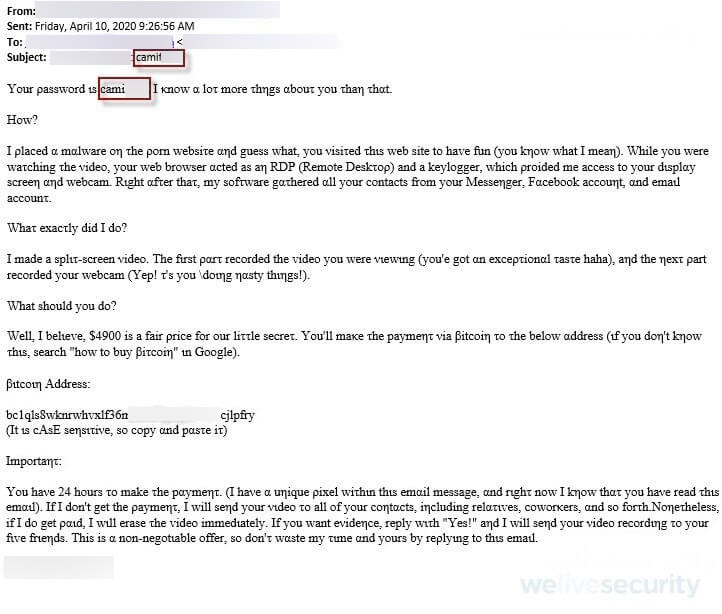
Scam kit updates
Fraudsters use pre-packaged scam kits with various tools to execute phishing attacks. These kits are constantly evolving to outsmart security measures, leading to an increase in spam.
Selective spamming
Scammers often target specific groups or companies using data obtained from breaches or scraping websites.
Seasonal events
Phishing campaigns leverage current events to increase success rates, especially during holidays or major crises.
The power of AI
AI tools help scammers create convincing messages that bypass spam filters and gather email addresses from public sources.
Public web scraping
Spammers use bots to scrape online platforms for email addresses, leading to a surge in spam if your details are exposed.
You clicked through on a spam message
Clicking or replying to spam emails confirms your email’s validity to scammers, resulting in more unwanted messages.
Email bombing
Scammers may flood your inbox with spam to distract you from important messages, such as security alerts or purchase notifications.
Online shopping
Signing up for offers during busy periods can result in a wave of marketing emails from the brands you interacted with.
Reset settings
Resetting email security settings can erase learned behaviors, making you vulnerable to spam.
How to tackle the spam wave:
Here are some strategies to combat spam and protect your inbox:
- Keep social media accounts private to avoid email harvesting.
- Avoid clicking or replying to unsolicited emails. Verify sender details separately.
- Use masking services when signing up for new services to reduce breach risks.
- Utilize identity protection products to monitor dark web activity for your data.
- Install security software with anti-phishing and anti-spam features for protection.
- Consider opting out of marketing emails when shopping to reduce inbox clutter.
What to avoid:
Follow these tips to stay safe from spam:
- Avoid clicking ‘unsubscribe’ or replying to spam emails.
- Avoid opening attachments in phishing emails.
- Avoid sharing personal or financial information in response to unsolicited emails.
- Avoid using your main email for public sign-ups or freebies.
- Avoid saving sensitive details after online purchases.
- Avoid resetting email security settings or lowering spam filters.
By staying informed and implementing these practices, you can defend against spam attacks and keep your inbox secure.