

ESET Research has identified a new ransomware known as HybridPetya on the VirusTotal sample sharing platform. This malware is a copycat of the well-known Petya/NotPetya malware, but with the added capability of compromising UEFI-based systems and exploiting CVE‑2024‑7344 to bypass UEFI Secure Boot on outdated systems.
Key points of this blogpost:
- New ransomware samples resembling Petya/NotPetya, named HybridPetya, were uploaded to VirusTotal in February 2025.
- HybridPetya encrypts the Master File Table, which holds important metadata about files on NTFS-formatted partitions.
- Unlike Petya/NotPetya, HybridPetya can compromise modern UEFI-based systems by installing a malicious EFI application onto the EFI System Partition.
- One variant of HybridPetya exploits CVE‑2024‑7344 to bypass UEFI Secure Boot on outdated systems using a specially crafted cloak.dat file.
- While ESET telemetry has not detected HybridPetya in active use, it does not exhibit the aggressive network propagation seen in the original NotPetya.
Overview
In late July 2025, suspicious ransomware samples were discovered on VirusTotal originating from Poland, with filenames like notpetyanew.exe, hinting at a connection with the destructive malware that hit Ukraine in 2017. The NotPetya attack caused over $10 billion in damages and was considered one of the most destructive cyberattacks ever. With similarities to Petya and NotPetya, the newly found samples were named HybridPetya.
While there is no evidence of active HybridPetya use, these samples can compromise modern UEFI-based systems by installing a malicious EFI application on the EFI System Partition, which then encrypts the NTFS Master File Table.
Further investigation on VirusTotal revealed an archive containing the EFI System Partition contents, including a HybridPetya UEFI application packaged in a vulnerable cloak.dat file, exploiting CVE‑2024‑7344, a UEFI Secure Boot bypass vulnerability disclosed by ESET in early 2025.
Despite the connection to NotPetya in filenames and ransom note format, HybridPetya differs in its decryption key recovery approach, allowing for key reconstruction from victim’s personal installation keys, making it function as regular ransomware rather than pure destruction.
On September 9th, 2025, @hasherezade shared a post about a UEFI Petya PoC, hinting at a potential relationship with HybridPetya as a proof of concept developed by a security researcher or unknown threat actor.
This blogpost focuses on the technical analysis of HybridPetya.
HybridPetya technical analysis
This section delves into the technical aspects of HybridPetya’s components, including the bootkit, installer, and a version capable of bypassing UEFI Secure Boot through CVE-2024-7344 exploitation.
The victim’s installation key generation code appears to be influenced by the RedPetyaOpenSSL PoC, with another UEFI-compatible PoC called NotPetyaAgain in Rust being unrelated to HybridPetya.
UEFI bootkit
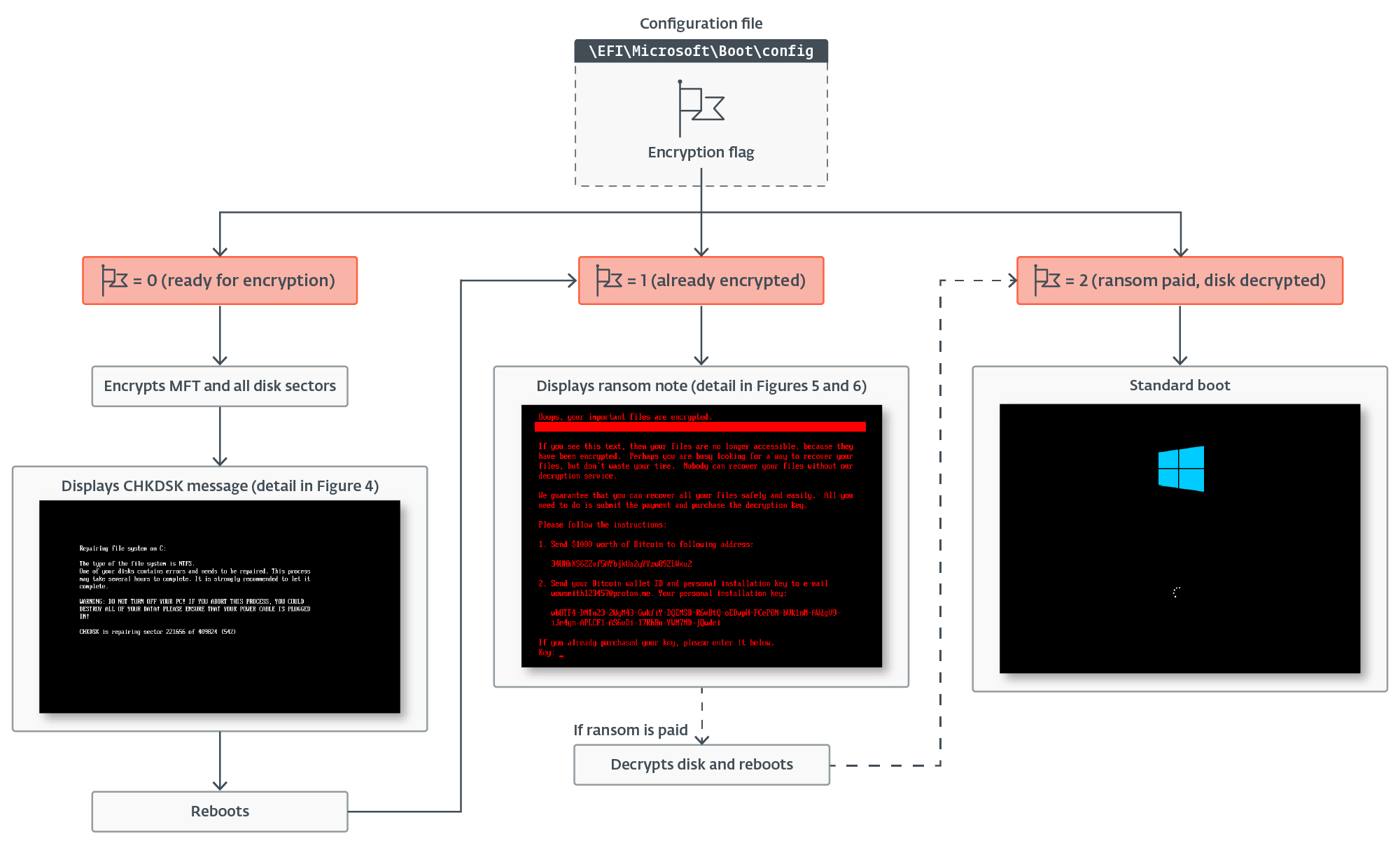
Two versions of the UEFI bootkit were obtained, both similar yet with distinct differences. The bootkit loads configuration data from \EFI\Microsoft\Boot\config, checking the encryption flag to determine the encryption status, following a logic similar to Petya/NotPetya.
Disk encryption
If the encryption flag is 0, the bootkit extracts the Salsa20 encryption key and nonce from configuration data, encrypts the \EFI\Microsoft\Boot\verify file, and initiates disk encryption, identifying NTFS partitions.
As depicted in the image provided in Figure 2, the sample achieves this by obtaining the list of handles for connected storage devices, identifying individual partitions by confirming that EFI_BLOCK_IO_MEDIA->LogicalPartition is TRUE, and then confirming whether the partition is NTFS formatted by comparing the first four bytes of data in the first partition’s sector with the NTFS signature NTFS.
After identifying the NTFS partitions, the bootkit proceeds to encrypt the Master File Table (MFT) file, which contains crucial metadata about other files and their data locations on the NTFS-formatted partition. As illustrated in Figure 3, during the encryption process, the bootkit updates the contents of the \EFI\Microsoft\Boot\counter file with the number of encrypted disk clusters and modifies the fake CHKDSK message displayed on the victim’s screen (shown in Figure 4) to reflect the current encryption status.
Following the encryption process, the bootkit initiates a reboot of the system.
Disk decryption
If the bootkit detects that the disk is already encrypted, indicated by the encryption flag value in the configuration file being set to 1, it presents the ransom note displayed in either Figure 5 or Figure 6 (depending on the bootkit version) and requests the victim to input the decryption key. It’s important to note that while the ransom note format of HybridPetya is similar to the original NotPetya (shown in Figure 7), the ransom amount, bitcoin address, and operator’s email address differ. Additionally, the bootkit version bypassing UEFI Secure Boot utilizes a different contact email address (wowsmith999999@proton[.]me) compared to the version deployed by obtained installers (wowsmith1234567@proton[.]me), with the bitcoin address remaining the same.
After entering a key of the correct length (32 characters) and confirming it by pressing Enter, the bootkit proceeds to verify the key. As shown in Figure 8, the key’s validity is checked by attempting to decrypt the \EFI\Microsoft\Boot\verify file with the supplied key and ensuring that the decrypted plaintext contains only bytes with a value of 0x07.
If the correct key is entered, the bootkit updates the configuration file with the encryption flag set to 2 and the decryption key provided. It then reads the contents of the \EFI\Microsoft\Boot\counter file, proceeds with disk decryption, and displays the decryption process status on the victim’s screen, as shown in Figure 9.
The bootkit then recovers the legitimate bootloaders \EFI\Microsoft\Boot\bootmgfw.efi and \EFI\Boot\bootx64.efi from the backup file \EFI\Microsoft\Boot\bootmgfw.efi.old created during the installation process.
Finally, after completing the decryption process and restoring the legitimate bootloaders, the bootkit prompts the victim to reboot the device, as depicted in Figure 10, to successfully start the operating system. However, the CVE-2024-7344 exploitation section indicates that there may be a variant that includes such an enhancement.
To determine if the system is UEFI-based, the installer collects disk information (IOCTL_DISK_GET_DRIVE_LAYOUT_EX), verifies the use of the GPT partitioning scheme (PARTITION_STYLE_GPT), and scans through the partitions until it locates the one with PARTITION_INFORMATION_GPT.PartitionType set to PARTITION_SYSTEM_GUID, which signifies the EFI System Partition. Once the EFI System Partition is found, the following actions are taken:
- Deletion of the fallback UEFI bootloader stored in \EFI\Boot\Bootx64.efi.
- Placement of a disk encryption-related configuration, including the encryption flag, in the \EFI\Microsoft\Boot\config file on the EFI System Partition, containing the Salsa20 encryption key, nonce, and victim’s personal installation key (base58-encoded data).
- Insertion of an encryption verification array of 0x200 bytes with a value of 0x07 into the \EFI\Microsoft\Boot\verify file on the EFI System Partition, encrypted by the bootkit component using the same Salsa20 key used for disk encryption. This array serves to confirm the validity of the decryption key entered by the victim.
- Creation of a backup for \EFI\Microsoft\Boot\bootmgfw.efi, the default bootloader for Windows-based systems, by duplicating it to \EFI\Microsoft\Boot\bootmgfw.efi.old.
After completion, a system crash (Blue Screen Of Death, BSOD) is triggered by invoking the NtRaiseHardError API with the ErrorStatus parameter set to 0xC0000350 (STATUS_HOST_DOWN) and the ResponseOption set to value 6 (OptionShutdownSystem), leading to a system shutdown.
The modifications described above ensure that on systems with Windows as the primary OS, the bootkit binary will be executed upon the device being powered on again.
CVE-2024-7344 exploitation
This section delves into an archive discovered on VirusTotal containing a variant of the UEFI bootkit discussed in the UEFI bootkit section, now bundled in a specially formatted cloak.dat file related to CVE-2024-7344 – the UEFI Secure Boot bypass vulnerability disclosed by our team in early 2025.
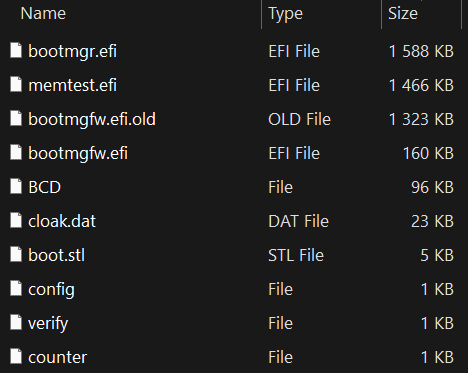
A rundown of the files in the archive and their contents indicates that this EFI System Partition was copied from a system already encrypted by this Petya/NotPetya copycat variant. While the installer responsible for deploying this version with the UEFI Secure Boot bypass hasn’t been obtained, the archive’s contents, as displayed in Figure 11, suggest a process similar to that detailed in the preceding section. Specifically, the archive includes:
- \EFI\Microsoft\Boot\counter, a file already containing a non-zero value denoting the number of disk clusters previously encrypted by the bootkit,
- \EFI\Microsoft\Boot\config, a file with the encryption flag value set to 1, indicating that the disk is already encrypted and the bootkit should proceed to display the ransom note,
- \EFI\Microsoft\Boot\bootmgfw.efi.old, a file with the first 0x400 bytes XORed with the value 0x07,
- \EFI\Microsoft\Boot\bootmgfw.efi, a legitimate but vulnerable (CVE‑2024‑7344) UEFI application signed by Microsoft (revoked in Microsoft’s dbx since January 2025), referred to in this section as reloader.efi, and
- \EFI\Microsoft\Boot\cloak.dat, a specially crafted file loadable through reloader.efi containing the XORed bootkit binary.
Per our report from January 2025, the exploit mechanism is straightforward. The cloak.dat file comprises specially formatted data containing a UEFI application. When the reloader.efi binary (deployed as bootmgfw.efi) is executed during boot, it seeks the presence of the cloak.dat file on the EFI System Partition and loads the embedded UEFI application from the file in an insecure manner, bypassing UEFI Secure Boot without performing integrity checks.
It is important to note that our January 2025 blog post did not delve into the exploitation intricacies, so the malware author likely reconstructed the correct cloak.dat file format through reverse engineering the vulnerable application independently.
This vulnerability cannot be leveraged on systems with Microsoft’s January 2025 dbx update applied. For guidance on safeguarding against and determining if your system is vulnerable to this exploit, refer to the Protection and Detection section of our January 2025 blog post.
Conclusion
HybridPetya represents at least the fourth documented instance of a real or proof-of-concept UEFI bootkit with UEFI Secure Boot bypass functionality, joining BlackLotus (exploiting CVE‑2022‑21894), BootKitty (exploiting LogoFail), and the Hyper-V Backdoor PoC (exploiting CVE‑2020‑26200). This underscores that Secure Boot bypasses are not only feasible but are increasingly prevalent and appealing to researchers and threat actors alike.
While HybridPetya is not actively propagating, its technical capabilities – particularly MFT encryption, UEFI system compatibility, and Secure Boot bypass – make it a subject of interest for future threat monitoring.
For inquiries regarding our research featured on WeLiveSecurity, please contact us at threatintel@eset.com.ESET Research provides private APT intelligence reports and data feeds. If you have any questions about this service, feel free to check out the ESET Threat Intelligence page for more details.IoCs
For a detailed list of indicators of compromise (IoCs) and samples, you can visit our GitHub repository.
Files
SHA-1 Filename Detection Description
BD35908D5A5E9F7E41A6 1B7AB598AB9A88DB723D bootmgfw.efi EFI/Diskcoder.A HybridPetya – UEFI bootkit component.
MITRE ATT&CK techniques
This information is based on version 17 of the MITRE ATT&CK framework.
Tactic ID Name Description
Resource Development T1587.001 Develop Capabilities: Malware HybridPetya is a new ransomware with UEFI compatibility and a UEFI bootkit component developed by unknown authors.
For more information and insights, make sure to visit the
ESET Threat Intelligence page.
Rewrite the sentence. sentence in your own words.